Local rank tracker: your Google Maps position, block by block
See your Google Maps ranking from up to 169 points across your service area, keyword by keyword, and track it every week with the competitors next to you.
14-day free trial · cancel before day 14 and pay nothing
One ranking number describes one spot. Your customers search from everywhere.
Google ranks the map pack partly on distance from the person searching, so a business can be first on its own street and missing two neighbourhoods away. A tracker that reports one position per keyword is describing a single spot. NearPinn checks your position from a grid of real coordinates across your service area and colours every point by rank, so you see the streets you win and the ones that cost you calls.
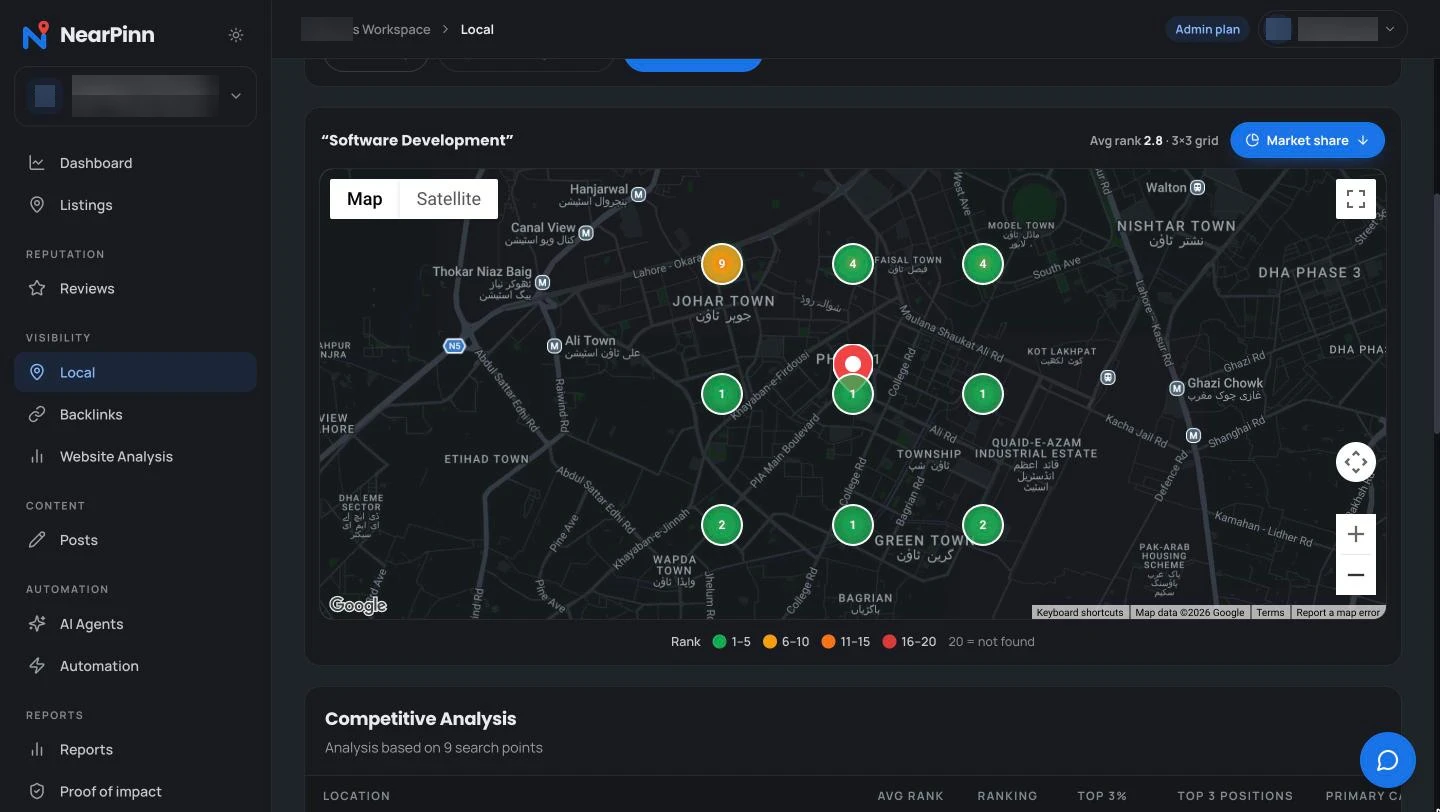
Grids run from 3×3 up to 13×13 points (169 searches in one scan). Each keyword keeps its own scan history, so you can re-scan after a change and see whether the green spreads.
From connected profile to full map, in four steps
Connect your Google Business Profile
Sign in through Google's own screen. The scan centres on your listing's location.
Pick a keyword and the grid
Grid size (3×3 to 13×13), the distance between points, the map zoom and the grid shape. Keep the same settings from scan to scan so results stay comparable.
Run the scan
Each point is coloured by rank: green for 1–5, amber for 6–10, orange for 11–15 and red for 16–20 or not found. The average rank across the grid is shown beside the keyword.
Read the competition and track it
Below the map, the competitive analysis lists who ranks at the same points. Scan again later and compare with the history.
Weekly keyword tracking alongside the grid
Grids show where you rank across the map; keyword tracking shows how a keyword moves week to week. NearPinn checks your tracked keywords every week and lists the current position, last week's position and the change.
You can also test how your keywords rank for searchers in another city or neighbourhood, up to two extra locations within 75 km, which helps when you serve customers beyond your own area.
- 1–5: you show up first
- 6–10: page one, slipping
- 11–15: below the scroll
- 16–20 or not found
| Keyword | This week | Last week | Change |
|---|---|---|---|
| software development | 2 | 4 | ▲ 2 |
| web development company | 5 | 5 | 0 |
| mobile app developers | 7 | 11 | ▲ 4 |
| custom software near me | 9 | 8 | ▼ 1 |
| it services | 14 | 17 | ▲ 3 |
For anyone who needs to know where the calls come from
Local businesses
Find out why calls come from one side of town and not the other.
Rank tracking on every plan
Starter
- 3 tracked keywords, checked weekly
Pro
- 10 tracked keywords
- Competitor comparison
Expert
- 20 tracked keywords
- Competitor comparison
- Monthly PDF reports
Every plan starts with a 14-day free trial. Full details are on the pricing page; to try the idea first, read the Google Maps rank checker guide.
Frequently asked questions
What is a geogrid rank tracker?
A geogrid rank tracker checks your Google Maps position from many points laid out in a grid over your service area, instead of from one spot. Each point shows the rank a searcher standing there would see, so you can tell where you are visible and where you are not.
How many credits does a scan cost?
One credit per grid row: a 3×3 scan costs 3 credits, a 7×7 scan 7 and a 13×13 scan 13. Starter includes 10 credits a month, Pro 20 and Expert 30. Unused credits roll over and extra packs can be bought anytime.
Can I track more than one keyword?
Yes. Each keyword gets its own grid and its own history. Weekly keyword tracking covers 3 keywords on Starter, 10 on Pro and 20 on Expert.
Does the rank tracker show competitors?
Yes. Every scan lists the businesses that rank across the same search points, with their average rank and how often they reach the top three. Competitor comparison in keyword tracking is included on Pro and Expert.
Keep reading
All rank tracking articles →See where you really rank
Connect your profile, run your first grid and find out where the green stops. Free for 14 days.