Schedule Google Business Profile posts, or let AI write them
Publish updates, offers and events to Google Business Profile in a few clicks, or let an AI agent write and publish them on a schedule for every location.
AI post credits on every plan · 14-day free trial
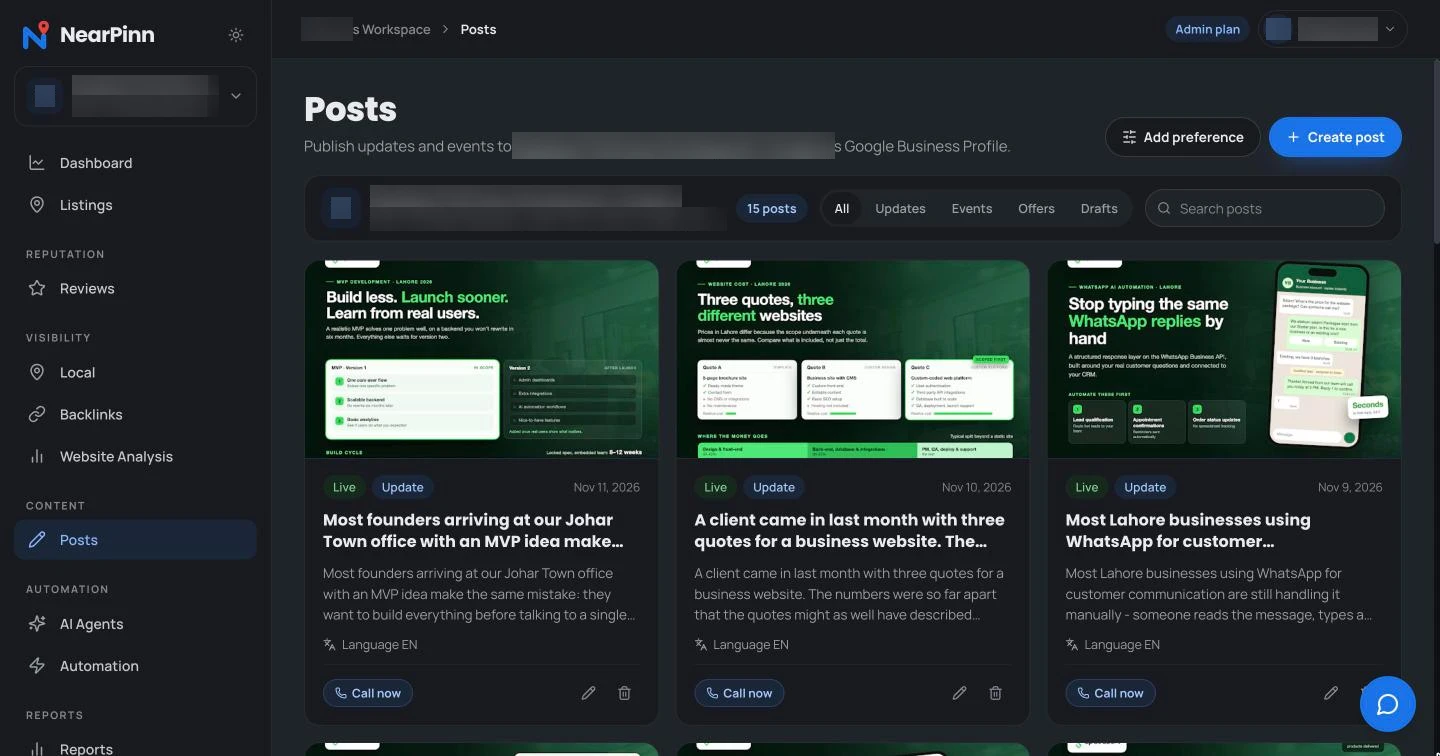
A profile that posts regularly looks open and cared for
Most businesses stop after a few weeks because writing posts is one more job. NearPinn lets you publish updates, offers and events in a few clicks, and can hand the writing to an AI agent that posts for you on a schedule.
Every post for every location sits in one list with its status, date and button, so you can see at a glance which profiles have gone quiet.
Updates
News, new services and opening hours over a holiday.
Offers
A deal with an end date and a button such as Call now.
Events
Something happening on a date customers can plan for.
Drafts
Save a post and finish it later, or let the AI write it.
Write it yourself, or put it on a schedule
Connect your profile
Connect your Google Business Profile and pick the location.
Write a post or ask the AI
Choose an update, offer or event, add a button such as Call now, and publish, or save it as a draft.
Set up the publisher agent
Give it the business context and tone, the same way as the review responder, so AI posts sound like the business.
Schedule it
An automation writes and publishes a post one, two or three times a week, up to your plan's AI post credits for the month.
A steady rhythm beats a burst of posts
The posts page lists everything published for a location with its image, title, date and status, and the button attached to it. Filter by updates, events, offers or drafts, or search the text to find an old offer and run it again.
One useful post a week beats five in one day and then silence. With an automation on a weekly schedule, the profile keeps posting during the busy weeks when nobody has time to write.
What to post
Good posts answer a question a customer has right now: an offer with an end date, an event, a new service, opening hours over a holiday. Posts are one part of a complete profile; the 12 Google Business fixes ranked by impact show where they fit, and how to rank higher on Google Maps covers the rest.
Keep every profile active without writing every week
Owners
Who want an active profile without writing every week.
AI post credits on every plan
Starter
- 1 automation
Pro
- 5 automations
Expert
- 10 automations
Every plan starts with a 14-day free trial; see the pricing page.
Frequently asked questions
Can I schedule Google Business Profile posts in advance?
You can put posting on repeat, not on a calendar. A post scheduler automation has the AI write and publish a post one, two or three times a week, within your plan's monthly AI post credits. A single post cannot be set for a specific date; posts you write yourself publish straight away.
Which post types are supported?
Updates, offers and events, plus drafts you can finish later. Posts can carry a button such as Call now.
How many AI posts are included?
AI post credits, which cover posts the AI writes, are included on every plan: 1 a month on Starter, 4 on Pro and 10 on Expert.
Do posts help Google Maps ranking?
Regular posts keep a profile active and give customers a reason to click, but they are one signal among many. Our guide on Google Business optimization ranks posts against the other fixes by impact.
Keep reading
All Google Business Profile articles →Keep every profile active
Connect your profile and publish your first post today, or let the AI schedule them. Free for 14 days.